HubSpot Plans and Pricing Guide: How to Choose the Right Hub and Tier (What We Actually Recommend)

Choosing the right HubSpot setup can get confusing quickly.

Not because the platform is unclear, but because there are:

  • Multiple hubs
  • Multiple tiers per hub
  • And a lot of features that sound important but may not actually matter for your business


We’ve worked with a wide range of clients, from early-stage teams to more complex organizations, and there are some very clear patterns in what works and what doesn’t.

This guide breaks down each hub in a simple way:

  • What it does
  • What really changes between tiers
  • And what we actually recommend

Marketing Hub

HubSpot Marketing Hub is the core of most HubSpot setups. This is where demand generation, email marketing, automation, and attribution all live.

What really matters

Marketing Hub decisions usually come down to:

  1. Automation capabilities
  2. Number of marketing contacts
  3. If there is a need for multiple “brands” (or business units) within the same portal

A quick note on marketing contacts (important)

This is one of the biggest misconceptions.

  • Your total database can be very large

  • With HubSpot, you only pay for marketing contacts (people you actively market to)

That includes:

  • Email sends

  • Ad audiences

  • Workflow enrollment

So you might have:

  • 200,000 contacts total

  • 40,000 marketing contacts

You only pay for the 40,000 contacts

Best Practices: Managing Marketing Contacts (Especially During Migration)

One of the most important—and often overlooked—parts of setting up HubSpot Marketing Hub correctly is how you manage your marketing contacts, especially when migrating from another platform.

1. Clean your data before importing

If you’re moving into HubSpot from another tool:

Do not import everything blindly

You should actively clean your database by removing:

  • Hard-bounced contacts
  • Invalid or low-quality emails
  • Unengaged or outdated contacts
  • Duplicate or incomplete records


This has a direct impact on:

  • Your email deliverability
  • Your reporting accuracy
  • And most importantly, your costs

3. Let your contact tier scale naturally

A better approach:

→ Start with what you actually need today
→ Let HubSpot scale your tier as you grow

When you exceed your limit:

  • HubSpot will automatically upgrade you to the next tier
  • Typically in increments of 5,000 or 10,000 contacts depending on your plan

This ensures:

  • You only pay for what you use
  • Your system scales with your business

Our Recommendation

  • Clean your data before importing
  • Start with a lean marketing contact tier
  • Let your usage scale naturally over time

→ Don’t pay for contacts you don’t need yet

This approach keeps costs under control while still allowing you to scale without friction.

2. Be conservative with your marketing contact tier

A common mistake is overestimating how many marketing contacts you’ll need.

For example:

  • Buying an extra 15k–20k contacts “just in case”


The issue is:

You start paying for those immediately, even if you don’t use them for months


4. Be aware of downgrade limitations

One critical detail:

→ Once you move up a marketing contact tier, you cannot reduce it immediately

Even if:

  • Your number of marketing contacts goes down


You’ll only be able to downgrade:

  • At your contract renewal date


Tier differences (simplified)

Starter


  • Basic email, forms, landing pages

  • Very limited automation (limited number of actions after a form submission, for example)

Professional


  • Custom reports, paid integrations (syncing of offline conversions), AEO tool, socials, and CTAs

  • Full automation (workflows)

  • Lead scoring

Enterprise


  • Advanced (attribution) reporting

  • Custom behavioral events

  • Multi-brand support

The pricing inflection point

At around 85k–90k marketing contacts, something important happens:

Professional becomes expensive due to marketing contact pricing

Enterprise becomes more cost-efficient

This is often the real reason companies upgrade from Professional to Enterprise.

Our recommendation

For most companies:

Marketing Hub Professional


We only recommend:

  • Starter → very small teams, simple campaigns
  • Enterprise → if:
    • You have multiple brands that you want to consolidate in one portal
    • You exceed ~90k marketing contacts
    • You need advanced reporting


Otherwise, Professional gives you everything you need to scale.

Sales Hub

HubSpot Sales Hub is focused on pipeline management, sales automation, and outreach.

What really matters

  • How automated your sales process should be
  • Whether reps manually manage leads or not

Tier differences (simplified)

Starter
(~$20/seat)

  • Up to 2 pipelines
  • Basic tracking
  • Limited workflows
  • Basic reporting

Professional (~$100/seat)

  • Multiple pipelines
  • Sequences (sales outreach)
  • Reporting and forecasting
  • Manual enrollment into sequences

Enterprise (~$150/seat)

  • Workflow-based sequence enrollment
  • Lead routing
  • Pipeline approvals
  • Advanced reporting and AI insights

The key difference

This is the big one:

  • Professional → reps manually enroll contacts into sequences
  • Enterprise → workflows do it automatically

That’s a major operational difference.


Our recommendation

→ Sales Hub Enterprise

The extra ~$50 per seat is worth it for:

  • Automatically enroll contacts into a sequence using workflows
  • Faster lead response
  • Advanced attribution reporting

Also worth noting:

Even if you don’t fully use Sales Hub (e.g., using Salesforce),
1 seat can still unlock a lot of value (reporting, custom objects, sandbox, sequences)

Service Hub

HubSpot Service Hub is essentially the support-side equivalent of Sales Hub.

What really matters

  • Automation of support workflows
  • Customer experience at scale
  • Routing and SLAs

Tier differences (simplified)

Starter (~$20/seat)

  • Basic ticketing and inbox
  • Up to 2 pipelines

Professional (~$100/seat)

  • Help desk
  • Knowledge base
  • Customer portal
  • Surveys and reporting

Enterprise (~$150/seat)

  • Workflow-based automation (like Sales)
  • Skill-based routing
  • Conditional SLAs
  • Customer journey analytics

The key difference

Same as Sales Hub:

  • Enterprise enables true automation
  • Professional still relies more on manual steps, but does unlock most features

Our recommendation

Service Hub Professional for most
Enterprise if you want:

  • Fully automated support flows
  • Advanced routing and SLAs

Data Hub (formerly known as Operations Hub)

HubSpot Data Hub is one of the most underrated parts of HubSpot, at least for those that don’t work in HubSpot on the daily.

This is where:

  • Data quality
  • Integrations
  • Advanced automation


all come together.

Tier differences (simplified)

Starter ($20/mo)

  • Data sync
  • Allows for custom  field mappings in many integrations

Professional ($800/mo)

  • Custom code in workflows
  • Data quality automation
  • Recurring workflow triggers

Enterprise ($2,000/mo)

  • Data warehouse integrations (Snowflake, etc.)

Why this hub matters

With tools like:

  • ChatGPT
  • Claude

Custom code is now accessible to almost anyone. You don’t need to be a developer anymore!

Instead of building:

  • Complex workflows with dozens of branches


You can:

  • Solve it with a single custom code step

Our recommendation

  • Always get Starter (especially for integrations: allows you to set up custom mappings!)
  • Professional if you have complex workflows where you currently use a lot of individual branches
  • Enterprise only for advanced data infrastructure + data warehouse integrations

Commerce Hub

HubSpot Commerce Hub is focused on quoting, payments, subscriptions, and billing.

Tier differences (simplified)

Professional (~$95/seat)

  • Quotes and payments
  • Quote templates
  • e-signature

Enterprise (~$140/seat)

  • Advanced quote approvals

Our recommendation

For most clients:

Not essential

But:

  • HubSpot is investing heavily here
  • It’s becoming a stronger quoting solution


Good option if you want everything inside HubSpot.

Content Hub

HubSpot Content Hub is HubSpot’s CMS.

Tier differences (simplified)

Starter ($20/mo)

  • Basic pages and hosting
  • Removes branding

Professional ($500/mo)

  • Smart content (website personalization)
  • Memberships
  • Advanced reporting

Enterprise ($1,500/mo)

  • Multiple websites
  • Content approvals
  • Advanced governance

Our recommendation

  • Starter → nice add-on
  • Professional → for content-driven teams
  • Enterprise → only for multi-site setups

A Critical Platform Insight: Custom Objects & Sandboxes

If you have any Enterprise hub, you unlock:

  • Custom objects
  • Sandbox environments


This applies across the entire HubSpot platform!

Why this matters

Custom objects let you model your business properly:

  • Subscriptions
  • Projects
  • Assets


Sandboxes let you:

  • Test (integrations) safely
  • Avoid breaking production

Our recommendation

Have at least one hub in the Enterprise tier (it does not matter which!)

Usually:

  • Sales Hub Enterprise or
  • Service Hub Enterprise


This is often more cost-effective than upgrading Marketing Hub.

The Smarter Option: Customer Platform

HubSpot Customer Platform bundles all hubs into one package.

Example:

  • ~$1,450/month for Professional

Includes:

  • Marketing
  • Sales
  • Service
  • Content
  • Commerce
  • Operations

Why this matters

If you’re buying:

  • Marketing Hub Pro
  • Data Hub Pro


You’re often already close to the bundle price. 
But with the bundle, you get everything.

The Customer Platform – Starter plan allows you to use all Hubs for less than $20 a month, which is a great bang for your buck!

Our recommendation

→ If you need multiple hubs, go with Customer Platform

It’s usually:

  • More cost-effective
  • More flexible long-term

Final Summary: What We Recommend

Marketing Hub

Professional (Enterprise only for contacts, brands, or advanced reporting)

Sales Hub

Enterprise (automation is worth it)

Service Hub

Professional (Enterprise if you want to enroll contacts automatically)

Data Hub

Starter always, Professional if scaling

Commerce Hub

→ Optional

Content Hub

→ Starter or Professional depending on use case

Our Overall Approach

For most clients, the ideal setup is:

  • Marketing Hub Professional
  • Sales Hub Enterprise
  • Data Hub Starter or Professional


Or:

Customer Platform Professional if there is a need for 3 or more Hubs

Final Thought

The biggest mistake we see is companies choosing HubSpot tiers based on features alone.

The better approach is:

→ Choose based on how you want your business to operate

  • Manual vs automated
  • Simple vs scalable
  • Siloed vs fully integrated


That’s what should drive your decision.

And remember: it’s easy to upgrade (higher tier of a Hub, or more marketing contacts/ seats), but more difficult to downgrade. 

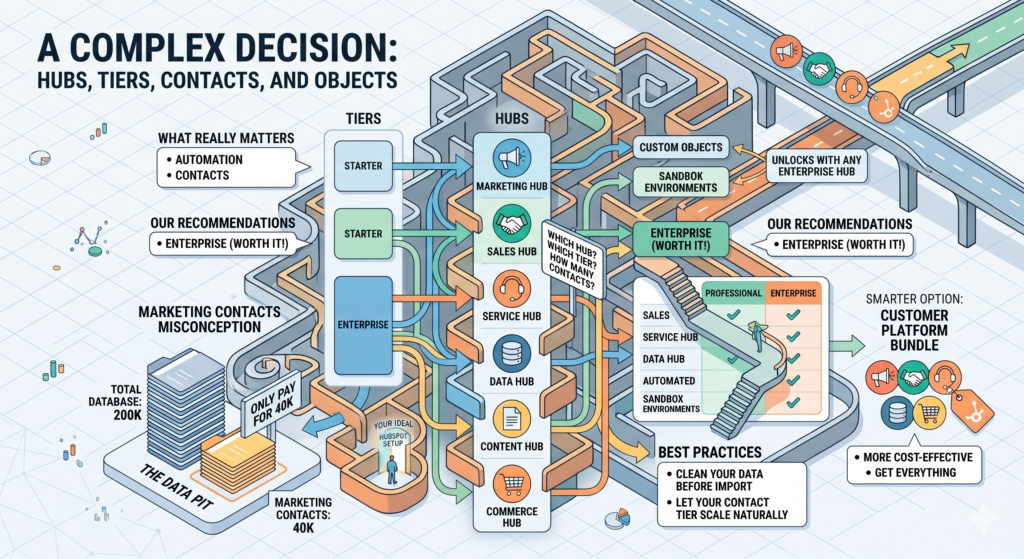
An isometric infographic maze illustrating the complex decision of choosing HubSpot tiers, hubs, and contacts. It visualizes the connections between Starter and Enterprise tiers with Marketing, Sales, Service, Data, Content, and Commerce Hubs, while highlighting the Customer Platform Bundle as the smartest option.

LET'S TALK ABOUT YOUR PROJECT!